
Home
What it does
-
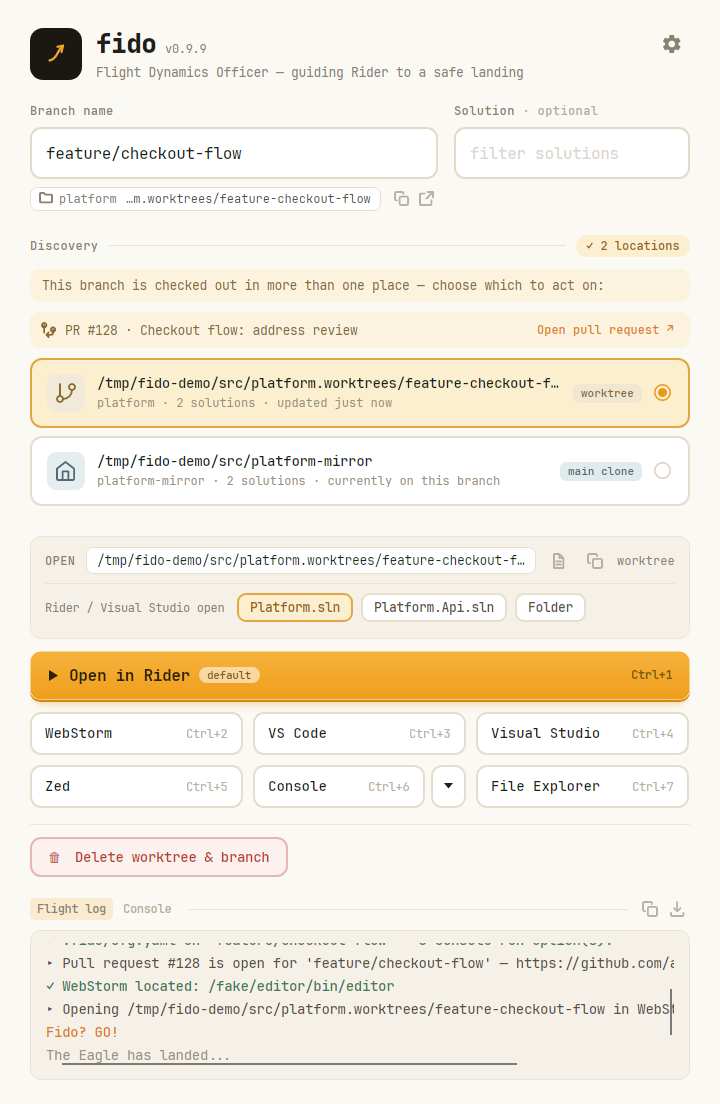
Finds the branch, everywhere it lives
Git enforces one worktree per branch only within a clone. Fido scans every search root and shows each location as its own card — worktree or main clone, labelled and ordered — so duplicates are visible instead of guessed at.
-
Opens it where you want
A default tool on the big button, every other tool one Ctrl+1 … Ctrl+9 away — or any shortcut you give it, two-press chords included. Solution chips for
.sln,.slnxand.slnf, or hand over the folder — plus a terminal and your file explorer. -
Configured by the repo itself
Commit a
.fido/cfg.yamland Fido reads it off the branch — your uncommitted edit first, thenorigin, then this machine. A worktree made before the config landed still gets it. -
Cleans up after you
Finished with a branch? Delete its worktree and local branch — and optionally the remote, unless an open PR says otherwise — from the same screen, behind an inline confirm that spells out exactly what goes.
-
Starts from the command line
fido feature/new-ui riderresolves the branch and auto-opens — but only when it is checked out in exactly one place. Multiple locations are presented, never guessed between. A window already open on the branch is brought forward instead of a second one opening. -
Runs the branch's scripts here
A Console tab beside the flight log: a real shell at the selected location, over a real pseudo-terminal. Pick a script from the branch's own config and watch it run — colour, Ctrl+C, and the output still there when it fails.
-
Points out the leftovers
The worktree folders a branch already has on disk are listed under the branch box — even when no repo has the branch. Last month's leftover is named the moment you type.
Why "Fido"?
A nod to the Apollo Flight Dynamics Officer — call sign FIDO — whose job was to track the spacecraft and compute its trajectory. Fido does the same for your code: a branch name in, its exact path on disk out. The flight log narrates each step as it goes around the horn, and when your editor comes up, the Eagle has landed.